1.4.3 is mostly about one page: the Version tab. It could always show you what you were running. Now it can change it.
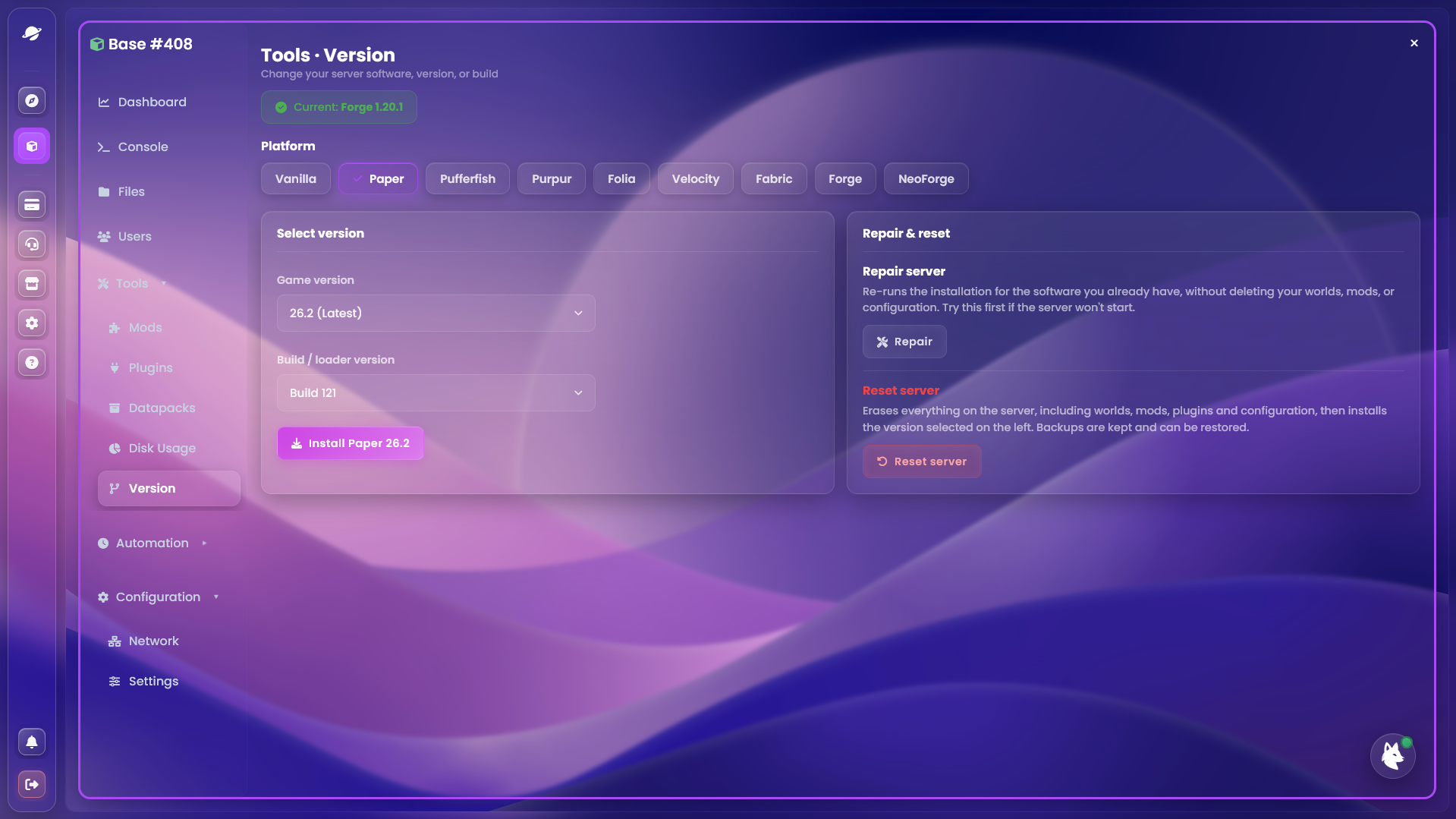
Install any server software, from the panel
Pick a platform, pick a game version, pick a build, hit Install. That's it. Vanilla, Paper, Pufferfish, Purpur, Folia, Velocity, Fabric, Forge and NeoForge are all there, with their real published version lists rather than a hardcoded set that goes stale.
The panel also picks the right Java version for you. Ask for 1.21 and it moves the server onto a Java 21 image; go back to something older and it moves back down. That used to be a support ticket.
Forge and NeoForge actually work now
This is the part that took the longest, and the reason is genuinely funny in hindsight.
Most server software is a single jar you download and run. Forge and NeoForge aren't, they ship an installer that has to run once inside your container to generate the real launch files. So we needed to run a command, wait for it to finish, and then work out what it produced.
The problem is that a Pterodactyl startup command isn't a shell script, even though it looks exactly like one. Before the container runs it, the entrypoint pushes the string through eval echo and then hands it to exec env. Which means a startup line like java -jar installer.jar --installServer; touch DONE; sleep infinity doesn't do any of the things it appears to do. The echo runs first, touch DONE fires immediately, and the whole thing then blocks forever inside a command substitution without ever reaching java.
So the install "finished" in about two seconds, with a completion marker, no errors, and no server. Every time.
The fix is to stop pretending the startup line is a shell. We write a real script to the server through the file API and point the startup at bash install.sh, which survives both passes intact. Everything complicated then happens inside a file where an actual shell is reading it. After the installer runs, the panel reads the JVM argfile the loader generated and points your startup at that directly, rather than at a run.sh that Wings can't execute anyway.
Forge and NeoForge installs now work on the first try, on modern and old versions alike.
Repair and Reset
Two new buttons live on the right of the Version tab:
- Repair re-runs the install for the software you already have. Worlds, mods, plugins and configs are untouched. This is the one to try first when a server won't start and you don't know why.
- Reset wipes the server and installs whatever you've selected on the left, so you land on a working server rather than an empty directory. Your backups are kept and can be restored afterwards.
Both are behind a confirmation, and the destructive one doesn't pre-focus its own button, so a stray Enter can't fire it.
The panel asks about the EULA now
Minecraft won't boot until eula.txt says you've agreed to Mojang's EULA. Previously, a fresh server would install perfectly, refuse to start, get restarted by Wings, refuse again, and sit there in a crash loop while the console scrolled the same line past you.
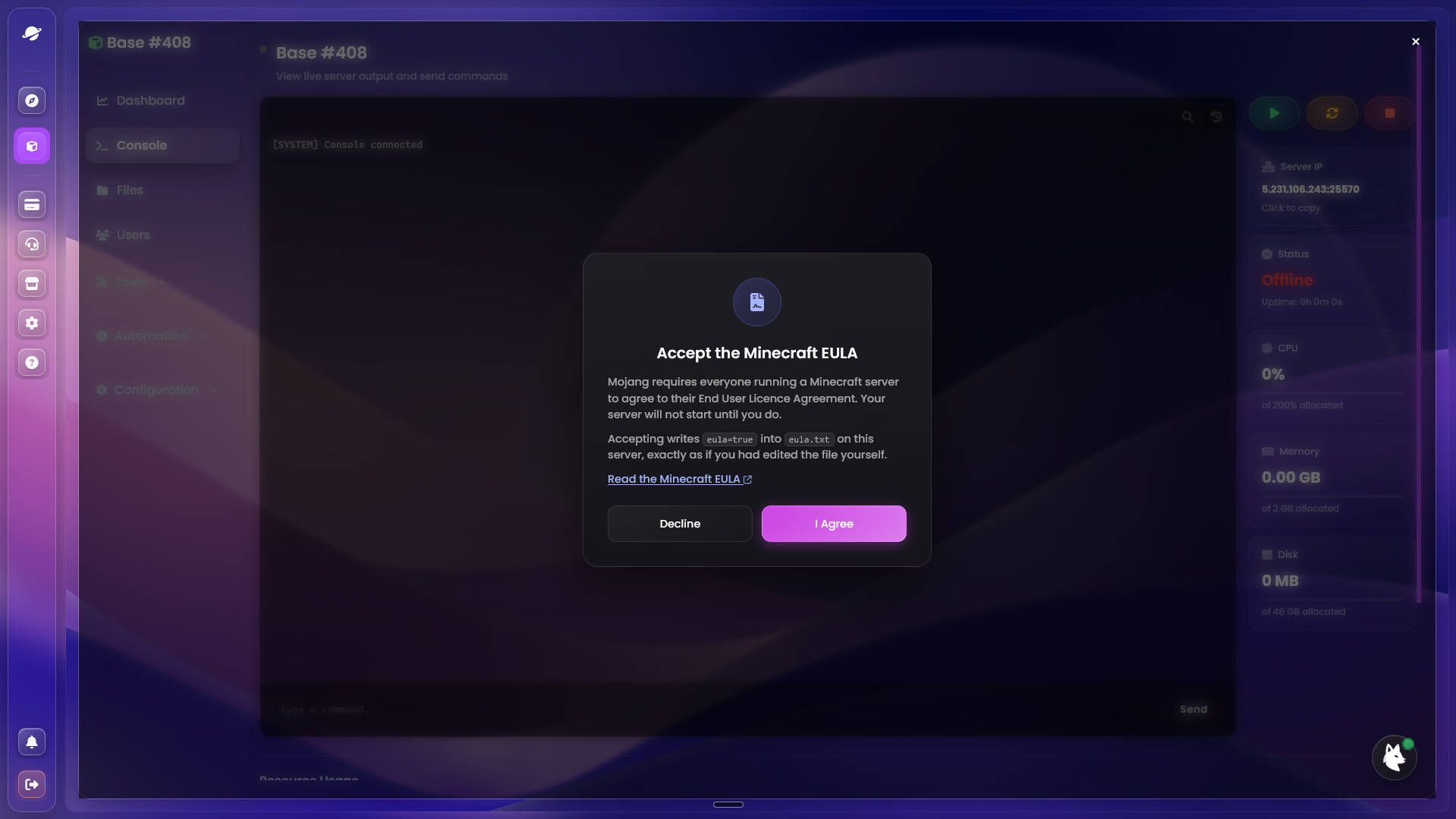
Now the panel asks. Once, up front, before an install or the first start, with a link to the actual agreement. Say yes and it writes the file; say no and it doesn't send the power action at all. It's your agreement to give, so the panel won't tick that box on your behalf, but it will make sure you're asked at a point where the answer is useful.
The Version tab looks different
The old page led with nine large cards, each with an icon and a one-line description of software you already knew about, which pushed everything you actually came to do below the fold. It's now a row of name-only chips and a two-column layout: choose and install on the left, repair and reset on the right.
The build dropdown also stopped disappearing. It used to be hidden until a build list arrived, which read as a missing field on slow lookups and made the card jump height every time you changed platform. It stays put and shows a loading state instead.
And it's a lot faster
Version and build lists are cached on both ends now, and the newest version's builds are sent down inlined with the version list, since that's the pair the picker always needs together. Opening the tab or switching platform is one round-trip instead of two sequential ones, and going back to a platform you've already looked at is instant. The caches also pre-warm in the background, and a failed lookup is evicted rather than remembered, so retrying actually retries.
Server upgrades are back
Outgrown your plan? You can resize a Minecraft server from Billing again, without opening a ticket and without moving to a new server.
Pick your new RAM, cores and storage, and the panel prices it with the same formula the store's custom builder uses, then invoices you for the difference between your current spec and the new one, not the full price of the new plan. Pay it and the resize applies straight away, rather than waiting on a sync job to come round. If you leave the invoice unpaid, nothing changes; if you cancel it, the pending upgrade clears itself out.
Coupon codes work here too. They're validated and applied to the price before the invoice is created, so what you're quoted is what you pay, and a code that covers the whole difference settles at £0 without needing a payment method.
Downgrades still need a ticket for now.
Also in this release
- Search by server ID. The Navigator search now matches on a server's identifier and UUID as well as its name, with exact and prefix matches ranked first, so pasting a full ID lands on the right server instead of nothing.
- The upgrade popup and the billing app got a visual pass, including coupon codes that were being accepted but not actually applied.
- Shadows stopped getting sliced off. Sidebar items lift and glow on hover, but the rails around them were clipping every one of those effects flat against their edges. Switching those containers from
overflow: hiddentooverflow: clipwith a clip margin gives the shadows somewhere to finish without letting anything actually scroll sideways. - Every confirmation dialog in the Minecraft app is now built from one shared component instead of hardcoded markup per prompt, so they all behave the same way: Escape closes, the backdrop closes, and the focus rules match.
- The setup wizard asks about the EULA before it starts, rather than stalling its own progress checklist behind a modal halfway through.
Found something broken? Open a ticket and we'll take a look.